Global Food & Beverage
Creating Operational Clarity for Store Teams
Helping 80,000+ retail workers find the updates, materials, and support they need
At stake
When navigation friction becomes operational drag
Licensed store employees and managers run locations in malls, airports, grocery chains, and other distributed retail environments while serving guests. They depend on an internal operational site for policy updates, store materials, support resources, and timely communications.
When the system drifts through unclear labels, weak findability, and content grouped by legacy structure rather than store workflows, teams rely on bookmarks, outdated paths, repeat questions, and informal workarounds. At 80,000+ workers, small navigation friction turns into huge operational drag between the field and central support.
This work restructures how a Salesforce-based operations product helps frontline teams find role-relevant information fast, manage their own store’s access and onboarding, and act on updates without routing through IT or corporate. It also gives content authors a structure they can maintain without it drifting back into the same problem.
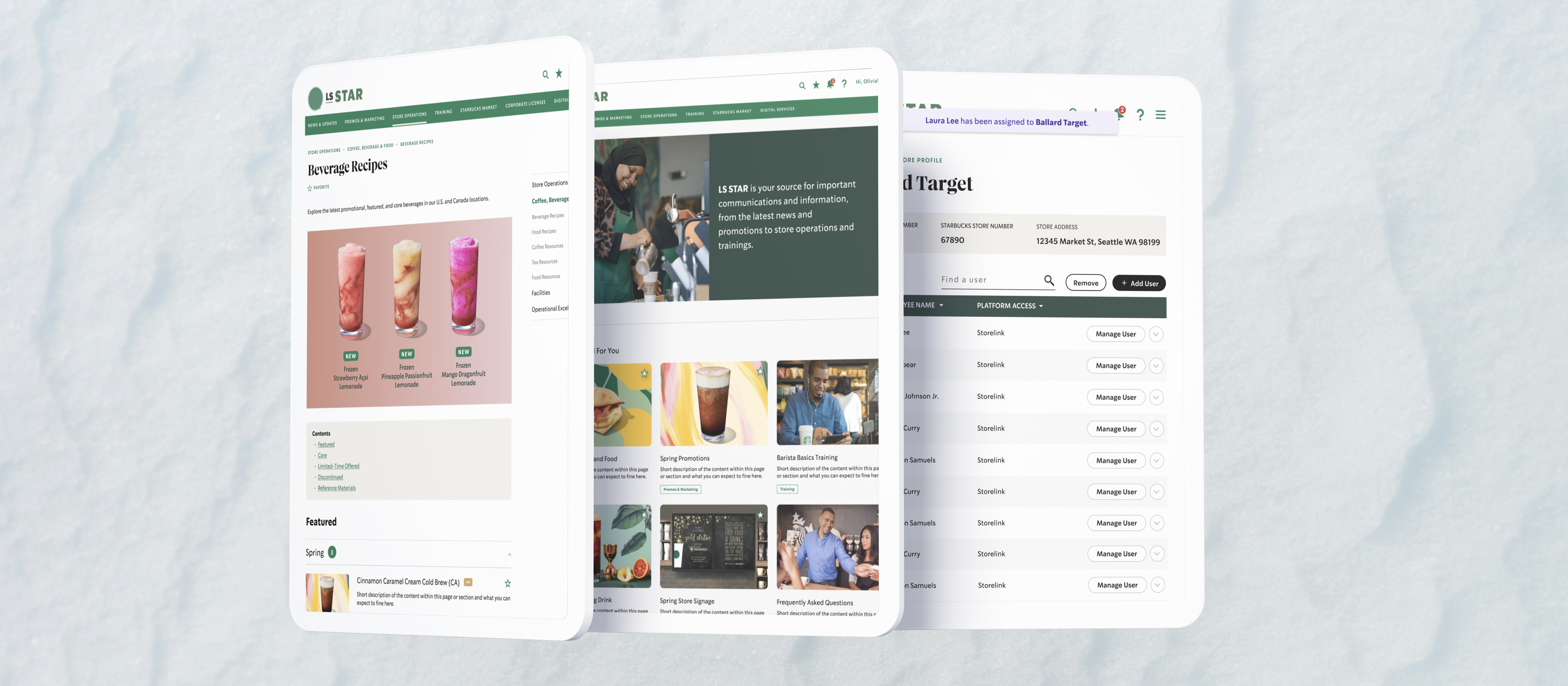
Final design overview
Scope & constraints
Role, tools, and what was in scope
As Senior UX Designer, I led information architecture restructuring, navigation and taxonomy design, and interaction patterns for the consolidated operational site. Tools included Figma and Salesforce.
In scope: IA and content grouping, navigation and exposed-menu patterns, role-relevant access, employee onboarding, access levels, multi-store identity management, notifications and quick access, favorites and return paths, store communications (individual vs all-store views), and patterns that give content authors more control within Salesforce navigation constraints.
System snapshot
How operational information reaches the field
StoreLink functions as an operational information system between central operations and the field. Content authors publish into Salesforce structure; navigation, notifications, and favorites expose that structure to store roles who act on updates, materials, and communications.
- Content author → Salesforce structure (sections, taxonomies, role rules) → navigation / notifications / favorites → store role → store action.
- Store employees need day-of updates, materials, and support while on the floor; store managers need team-relevant information, sharing paths, and store-specific monitoring; district leaders need network visibility without drowning stores in noise.
- Content authors maintain navigation, group content, and target role-relevant updates within Salesforce-driven controls.
- Operational updates, store materials, notifications, favorites / saved content, and store communications (targeted vs all-store) are the core objects teams move through daily.
What I optimized for
Principles for clarity at scale
- 1. Make role-relevant information easier to find: navigation and grouping follow store mental models, not legacy content buckets.
- 2. Put access and onboarding in managers’ hands, not IT’s queue: self-service identity management that does not require training.
- 3. Reduce dependence on bookmarks and workarounds: expose content before users commit to a path; strengthen return paths for high-frequency references.
- 4. Close the gap between “something changed” and “I can act”: notifications and quick access for timely operational updates.
- 5. Separate signal from noise at scale: individual and store-targeted communications versus broader all-store visibility when the network view matters.
- 6. Give authors control without IA chaos: Salesforce-friendly patterns so authors maintain navigation and role-relevant content within structure.
Decision 1
Rebuild IA around how store teams actually work
What changed: Labels, content grouping, and navigation hierarchy shifted away from inherited internal buckets and toward store workflows and employee mental models.
Why it mattered: When structure does not match day-of work, every task starts with hunting. Managers and store employees pay the cost during service.
What constrained it: Salesforce content structure and existing material had to migrate without losing critical paths authors already maintained. The sitemap shows the legacy content-bucket taxonomy beside the workflow-based IA, including the new My Stores > Store Profile > User Details path for employee access.
Decision 2
Give managers self-service control over employee access
What changed: Store managers can onboard employees directly, set access levels, and manage everything from one list without routing through corporate IT. This includes a fallback authentication path for employees without a corporate email, and a single employee identity that can be linked across every store they work rather than a separate account per location.
Why it mattered: Licensed retail locations do not have on-site IT support, and staff turnover is constant. Access also had to work for employees who do not have a corporate email to receive two-factor codes through, and for managers overseeing more than one store. Solving these in isolation would have meant three disconnected patches instead of one coherent access model.
What constrained it: Access levels had to map to the existing role structure. Any fallback authentication still had to meet security requirements for a second factor, and had to make an unfamiliar method understandable enough for a manager to give informed acknowledgment before proceeding. Store relationships had to stay easy to add or remove as staffing shifted, without creating orphaned accounts.
Decision 3
Help managers find their way without hunting or bookmarking
What changed: Exposed navigation lets employees scan section content before choosing a destination, and favorites replace informal bookmarking with a sanctioned, scannable return path for recurring references.
Why it mattered: Wrong turns and repeated back-navigation cost time for users who do not live in the tool daily, and teams were already using bookmarks as a coping mechanism. The product needed to support both browsing and repeat access properly instead of leaving people to route around it.
What constrained it: Density versus scanability on smaller viewports, patterns had to work within Salesforce navigation behavior, and favorites had to stay manageable at scale rather than becoming a second broken taxonomy.
Decision 4
Make updates and notifications easier to act on
What changed: Centralized notifications and quick-access paths connect “something changed” to detail and action without hunting across sections.
Why it mattered: Operational updates only help if stores see them and can respond while running the location.
What constrained it: Update volume and variety; UI had to prioritize timeliness without hiding historical context.
Decision 5
Separate role-relevant communication from all-store visibility
What changed: Targeted and individually relevant communications sit alongside an all-store view when broader network context is needed.
Why it mattered: District and store roles need different lenses. Noise for one role is essential for another.
What constrained it: Permissions and authoring rules had to stay clear for authors publishing at different scopes.
Decision 6
Give content authors more control without losing structure
What changed: Patterns let authors adjust navigation and role-relevant content within Salesforce guardrails while maintaining wayfinding and tuning what each role sees.
Why it mattered: IA that cannot be maintained drifts back to confusion; authors are the long-term owners of findability.
What constrained it: Flexibility for authors versus consistent navigation for 80,000+ users. Structure had to hold as content changed.
Results
What changed
- · Aligned navigation to store workflows and employee mental models through research with baristas, store managers, and district leaders.
- · Enabled managers to onboard and manage employee access directly, including workers without a corporate email, reducing dependence on IT tickets.
- · Reduced reliance on bookmarks and informal workarounds by making content easier to scan and find.
- · Gave content authors more control to maintain navigation and role-relevant content within Salesforce structure.
- · Helped store managers share information and monitor store-specific content more clearly.
The consolidated experience replaces a fragmented operational site with IA and interaction patterns aligned to how distributed stores run, so frontline teams spend less time fighting the tool and more time serving guests.
Next
What I'd push further
Role-based personalization beyond static role surfaces: default landing tuned to frequency and location context.
Search analytics and zero-result tracking to see what 80,000+ users still cannot find after IA improvements.
Content governance for Salesforce authors: templates, naming rules, and review cues so flexibility does not erode structure.
Notification prioritization logic: what must interrupt versus what can wait when update volume spikes.
